Rare Treat: paid iPhone apps for FREE

I’m always on the lookout for technology I can run from my iPhone or iPad that will make my life easier, safer or more fun.  The apps listed below will help me free up space on my devices, help me find my way to safety if I’m lost without a signal or in an area unmapped by traditional navigation apps, capture an entire website in one screen shot, and will help me get back into 5K form in just 7 weeks.  The bonus is that, for a limited time, the apps are Free!  Hmmm

Free Up Space Normally $4.99   It recovers wasted space on your iOS device by:

  1. Finding duplicate photos: If you take a lot of photos/selfies you should use this feature often. This helps you find duplicate photos of all levels ranging from least similar to exact duplicates.
  2. Resizing Photos: You can save a lot of space by resizing large photos. Quality is maintained while reducing the size.
  3. Compress Photos & Videos: You can save storage space by compressing large photos & videos. Once you’ve compressed them, you can easily share them with your friends via attachments, messaging apps etc.

SwiPartyNormally $1.99

  1. Easy-to-use music map.  Swipe to stream your personal party playlist!
  2. SwiWorkout classifies and recommends workout music for you.
    Fast tempo on the right, slow ones on the left; New on top, old on bottom.
    SwiWorkout gives you a playlist immediately!
    You can suggest/add workout music you love by contacting Swibeat directly: http://www.swibeat.com/Contact.p

Run 5K ProNormally $1.99   Train to run a 5K in 7 Weeks!

EASY TRAINING PLAN

  • 30 minutes a day, 3 times a week – and you’ll be able to run 5K in 7 weeks;
  • Effective training plan from professional coaches;
  • Use outdoors and on a treadmill;
  • Audio cues during all workouts to keep you focused;
  • GPS maps saved for each training session;
  • Apple Watch support.

NEVER GET BORED

  • Gradual increase of workout intensity for best result;
  • Inspirational quotes keep you motivated while running;
  • Motivational tips on running with each training session;
  • Listening and managing your favorite music from the app;
  • Sharing results with Facebook & Twitter friends.

MUSIC TIMED TO YOUR WORKOUT

  • Unlimited access to the best running music right from the app;
  • Music tempo adjusts to your workout rhythm – music plays faster as you run faster;
  • New mixes from talented DJs are available every day;
  • All genres – from Classical and Oldies to Rock, Hip-hop and R&B;
  • Convenient search and suggestions to find perfect mixes.

TRACK YOUR PROGRESS

  • Calorie counting;
  • Detailed statistics: pace, distance, time and other parameters;
  • Synchronization of your stats & logs with an upgrade from the free version;
  • Synchronization with Apple Health app;
  • Integration with Runkeeper, Fitbit, MapMyRun.

WebpageShotNormally $4.99   

  • A simple tool to convert a webpage into an image.
  • It captures the whole web page not just what you see on the screen.
  • It also provides a screenshot extension for Safari on iOS 8.
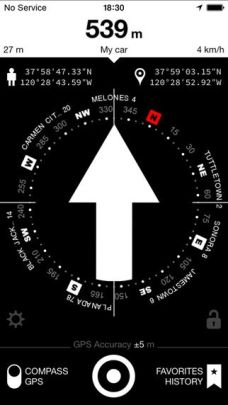
iarrowiArrowNormally $1.99   iArrow provides navigation where there are no roads. The app will lead you back to your car, campsite or hotel and help you reach the nearest settlement if you get lost. This app features a built-in database of 2,000,000 localities around the world and does not require internet or cellular connection.

Unlike navigation systems that show a blank map, iArrow instantly launches and very clearly indicates the direction and distance to the destination. The app consumes little energy and saves battery power.

Great for travelers, fishermen, hunters, extreme or off track athletes and anyone who works in remote locations. You can save the coordinates of key points along your route to your clipboard to share via SMS, Email, Twitter, Airdrop, etc..

APP FEATURES

  • User Guide
  • You do not need an Internet connection *
  • 2,000,000 settlements in the database
  • Built-in online map
  • Ability to search for objects by address
  • Automatic detection of the address of the current position
  • Indication of GPS accuracy
  • Determination of direction using magnetic compass
  • Determination of direction using GPS coordinates
  • Radar mode that displays Favorites, History and settlements
  • Displays full information about position, speed, altitude, etc.
  • Lock screen
  • Settings
  • Metric and Imperial Units
  • Low energy usage
  • Support for iOS8 and iPhone 5/5s/6/6+

WORKING WITH COORDINATES

  • Support for the latitude/longitude, UTM and MGRS coordinate formats
  • Support latitude and longitude as decimal degrees, degrees/minutes/seconds etc.
  • Easy input of coordinates – special keyboards for each format
  • Setting destination using azimuth and distance
  • Convert GPS coordinates between degrees formats, UTM and MGRS on the fly
  • Viewing coordinates on an online map
  • Sending and receiving coordinates via SMS
  • Import and export coordinates via SMS, Email, and Airdrop
  • Import and export list of coordinates
  • Import and export links to Google, Apple, Yandex, and OSM maps
  • Import coordinates from the clipboard
  • Automatic determination of format of imported coordinates
  • Easily add, delete, or edit coordinates
  • Automatically save the coordinates in History
  • Search in Favorites and History
  • Sorting Favorites/History by new and nearest points
  • List of nearby settlements

I am not anxious to need the iArrow app, but I am going to load it in the off chance I ever get lost and need to find my way out of the wilderness. You can find all of these in your App Store.

Are you on Facebook?  If you are interested in blog follow ups, free or discounted stuff I find, things that make me wonder, laugh or scream in frustration, join the more than 2,500 people who find me engaging or amusing at the page dedicated to this blog: https://www.facebook.com/extremeblondemoments


I Thought Blogging WAS a Non-Impact Activity

computerinjurySome of my 2000+ followers may have missed me for the past 2 weeks.  It seems that my obsession with using my computer, iPad and iPhone for communication, research and yes, blogging, has combined with my exercise routine to add yet another painful ailment deal with.

24 years ago I was a passenger in a car accident that broke my pelvis in multiple places, broke my ankle, caused a reverse curvature of my C-Spine, gave me a memory impairing concussion, and severely damaged my sciatic nerve which has resulted in doctors advising me not to take part in any high-impact activities ever since.

I try to follow their recommendations: I swim, do Pilates, walk (never run) on the treadmill, lift very light weights and I blog.  None of that should have caused me injury, but apparently all can contribute to the aches and pains I have radiating out from the teeny tiny little nerves in my neck, the cervical nerves:

  • C5 – controls the Deltoids (the rounded part of the shoulder) and the Biceps (flexion of the elbow and rotation of the forearm)
  • C6 – controls the muscles that make up the wrist extensors and enable wrist extension and hyper extension and the movements that are tied to the Biceps (front of the upper arm)
  • C7 – controls the Triceps (muscles in the back of the upper arm that allow the elbow to straighten)
  • C8 – controls the hands

I suffer from Cervicogenic Headaches:  Headaches originating from the neck often as a result of repetitive or prolonged turning of the neck (e.g. breathing during swimming), slouching (especially during sitting, sleeping or use of a computer), bending forwards of the neck (e.g. hunching over to read a phone/tablet), shoulders forwards activities (such as gripping the band handles for rowing or butterflies at Pilates).

The last two weeks have been unbearable.  I’ve had a nagging headache in the top of my forehead and in my temples; pain, stiffness and difficulty turning my neck; my mid-back, shoulder blades and elbows ache; I have painful pins and needles and numbness in my hands and fingers; as well as a few bouts of dizziness.

I thought I could manage the pain with trigger point injections in my neck and upper back and a good massage.  I was so wrong!  The combination resulted in  even more pain and numbness and now has me in wrist neutralizing braces while I’m awake as well as trying to sleep.

  • Neurontin combined with a muscle relaxant dulls the pain enough for me to get a few hours sleep at night, but I am only comfortable on my back.  Unfortunately lying on my back compresses the base of my skull on the right and makes the pain and other symptoms worse.
  •  Typing puts my wrists in the wrong position and sends shooting pains up my arm & directly across my shoulders to my neck symptoms that mimic Carpal Tunnel Syndrome.  So now I have wrist position neutralizing braces for use during the day and while I sleep.

mrtpicIf these remedies don’t start to work soon I will be off to my favorite ART (Active Release Techniques) and Myofascial Trigger Point Release practicing chiropractor, Dr. Ron Higuera.  He has worked minor miracles on my body, but there will be cussing, crying and pain while he’s fixing me, so I think I can be forgiven if I am willing to try the chicken’s way first…hmmm.

If you are on Facebook and are interested in the things I may not devote an entire blog post to, but that make me wonder, piss me off, funny quips, photos and other things, I have a page followed by more than 2,000 people who find me engaging and/or mildly amusing:  https://www.facebook.com/extremeblondemoments

iPhone, iPod or iPad Not Charging?

ichargerI have been through every version of the iPhone and am now on an iPhone 6.  I had a 2nd Generation iPad and upgraded to an iPad Air 2 with both cellular and wifi options for connection, as well as purchasing an iPad Mini for my husband.

The change from the old style charging cable to the lightning cables/port was great, for a while, but now, despite using Apple branded/supplied cables, blocks and docking stations, my Apple products display these messages intermittently:

  • Not Charging
  • This cable or accessory is not certified and may not work reliably with this iPhone/iPad (whichever happens to be plugged in)

To say I am frustrated is an understatement!  I love my Apple products (although I am a loyal PC girl) but I am at my wits end – I’ve even gone so far as to buy a Samsung Android based phone on another carrier just so I know I always have a hot backup.  Even I see that as an absurd waste of money.  I NEVER had this problem on the older versions of my iPhone and iPad but since I’ve upgraded I’ve had nothing but issues!

I’ve scoured the internet and read articles, forums, blog posts and watched videos all describing the same issue I’m having, but none of the suggested fixes have stopped the problems I am having!

All of the articles came to the same three conclusions:

  1. The wall adaptor (i.e. Block) is bad
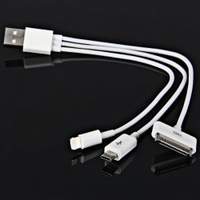
  2. The Lightning or 30-pin USB cable is bad
  3. The charging port on the iPhone/iPad/iPod is bad
  4. The internal battery is bad
  5. The software has crashed and needs a refresh

Suggested Fixes:

  • Move to another wall plug – you could be using a bad outlet
  • Change the USB charging cable (The cables are prone to fraying at both ends and are covered under the Apple warranty.  It may be able to be swapped for free if you have a recently purchased Apple product)  If you are using a third party cable, make sure it’s a certified Apple compatible product (the cheap ones usually aren’t and fail a lot).  Amazon Basics are reliable and less expensive third party options, plus they have longer options than the standard supplied USB cables.  If you an charge via your computer, but not via the wall charger, or vice versa, your cable is not the problem.
  • Use a different charging block
  • Do a “Hard Reset” by pressing the power and home key simultaneously until the Apple logo appears then let go and let the reset finish

None of these suggested problems or fixes for them resolved my problem.

Today, after another day of struggling to keep my phone charged, I came across an article on c|net that suggested the problem could be microscopic debris in the USB port on the computer, the charging block, the USB Port on the computer/charging block/phone charger/portable charger, Or even the USB end of the charging cord.  Finally something new (that made sense) and that I hadn’t tried!

Hmmm

Think about the places that iGadgets get left: pockets, purses, briefcases, backpacks, desks, counters, floors, center consoles, car seats, virtually everywhere that dust, lint, dirt, and gunk gather.  That poor little charging port doesn’t have a chance!

A trick suggested by an Apple Guru is to take a small anti-static brush or brand new toothbrush and gently brush out your iPhone’s charging port.  Toothbrushes work well because the bristles don’t conduct electricity.  Make sure to brush out the USB ports on your computer, charging blocks, car chargers and the other ends of your charging cords then plug everything back in.

Hopefully you see the little lightning bolt in the right top corner of your device and your problem is solved.  If you don’t you may need to see if you’ve somehow damaged your charging port by getting it wet…I hope not because that could require either an expensive fix or complete replacement of your device.

If you are on Facebook and are interested in the things I may not devote an entire blog post to, but that make me wonder, funny quips, photos and other silly things, I have a page followed by more than 1,900 people who find me mildly amusing:  https://www.facebook.com/extremeblondemoments
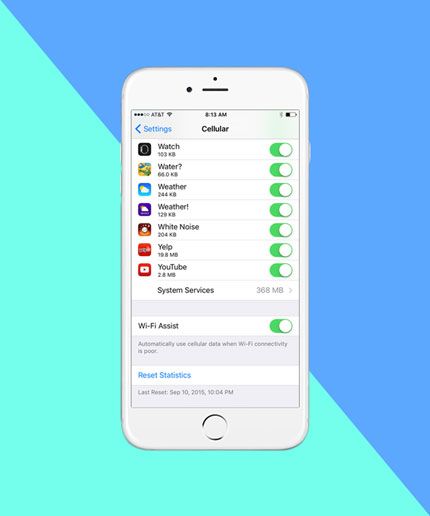
Beware iPhone/iPad Wifi Assist

wifiassistToday is very short.

Users of Apple iPhones and iPads have begun complaining that an update to their operating system has resulted in unexpected data overages.  They are not imagining things.

Apple seems to have found a sneaky way to make it seem like they never lose data connection by boosting the crappy wifi adaptors in their products via installation and automatic activation of a feature called, “wifi assist” in the most recent ios9 update!  What this does is turn on your cellular data plan (the one you pay for – remember: wifi usage is free) to boost poor quality wifi signals.

While it seems like a good idea, consider the following:

  • Using Wifi on your apple devices is free – if your cellular data kicks in, it draws down your monthly contract allotment and you will run out, causing you to be charged for excess data usage at a higher rate per mb
  • Unlike the Facebook charge hoax that circulated yesterday, this story of a “hidden” potentially costly feature in ios9, is indeed true as reported on:  CBS News , Gizmodo, Mac World, zdnet, refinery29 and many other tech websites yesterday.  Click on any of the links above and you’ll be able to see the information.

I have unlimited data on my iPhone, thank God for the Grandfather clause in my plan, but not on my iPad.  Lo and Behold I checked, in the very strangely placed location for the on-off button, and found that the feature was automatically enabled on my iPad.

For those who don’t want to pay for a bunch of sneaky minute charges, here is how to turn off wifi assist:  The off switch is somewhat buried, located in Settings>Cellular near the very bottom of the screen, under the cellular settings for all of the apps installed on the phone. Click the button on the screen to off and you are good to go.

As soon as my husband gets home, I am making sure his settings are changed too!  Hmmm indeed!

If you are on Facebook and are interested in the things I may not devote an entire blog post to, but that make me wonder, funny quips, photos and other silly things, I have a page followed by more than 1,900 people who find me mildly amusing:  https://www.facebook.com/extremeblondemoments