Fixing My Own iPhone Was a Bad Idea

brokeniphoneWhile standing to allow late arrivals to the USC football game to pass by, my iPhone 6 fell out of my jacket pocket and landed awkwardly on the concrete.  The thud & sound of shattering glass made my heart, and wallet, sink.

I’d removed the case to allow the phone to charge, so I was sure I’d broken the glass, but hoped my screen had survived the fall under the screen protector.  No such luck.  The only thing the screen protector did was to contain the glass that had shattered into many, many, many pieces beneath.

how-hard-can-it-be_designI knew it would easily cost me over $100 to have just the glass replaced and who knows how much if there was more damage to the phone itself, so I looked to Amazon to see if I could get the parts for less and install them myself.  I’m a reasonably intelligent girl and pretty handy, how hard could it be?  Hmmm

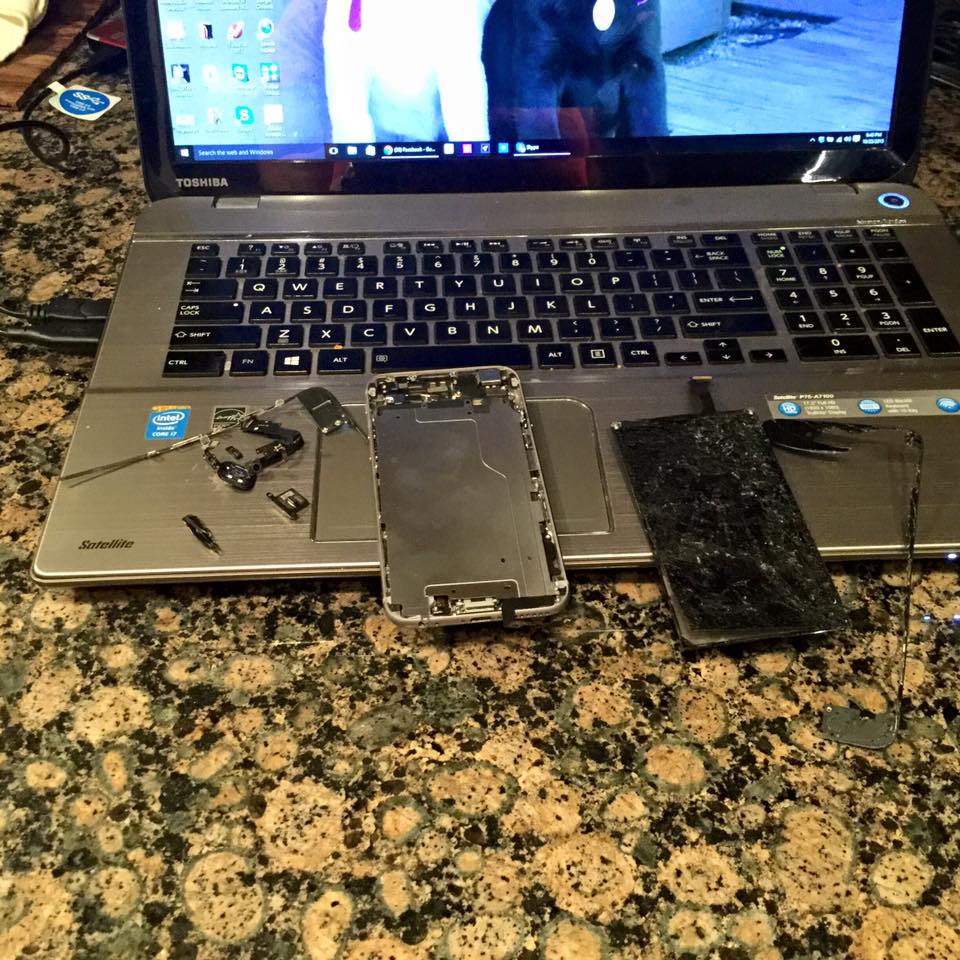
A few YouTube videos, a glass of wine, and an $8 glass repair kit later, I stood beside my kitchen counter with a dozen teeny tiny screws, a mess of broken glass and a damaged digitizer.  Even worse, I was now holding a completely dead iPhone and would need more parts to try and make the repair myself.

The last thing I wanted to hear was my husband’s, “You should have taken it to the repair shop.” Back to Amazon I went and made a Prime purchase of another $77 in additional parts to be delivered the next day.

The parts arrived and I followed the installation instructions, but the phone still wouldn’t fire up, so, tail between my legs, I asked my husband to go to the repair shop with me to see if my phone could be salvaged, which would mean paying at least another $100 in repairs…

Good News – Bad News; Good News – Bad News

Good News:  I installed the parts correctly.

Bad News:  1)  The Screen kit I bought was bad, which is partly why the phone wouldn’t fire up.  2)  The damage to the phone included the internal screen light, so more than the screen repairs would be necessary to salvage the phone.

Good News:  1)  I could return the non-working part to Amazon and get my $77 back  2) I’d anticipated the likelihood of needing to replace the phone so I had negotiated with AT&T to have the early upgrade fee of $250 waived and a new iPhone 6s was on the way.

Bad News:  1)  It did cost me $575.00 2) I’d be 2 more days without a phone 3) I’d planned to sell the working 6 to Amazon for $435 to offset the cost of the new phone.  No working phone = No $435, but I did get $75 for the salvageable parts and no bill from the repair shop.  For this I did get an, “I told you so.”

Very expensive lesson learned.  I will never attempt to repair any electronic item ever again.  I’ll be leaving that to the experts!

Are you on Facebook?  If you are interested in blog follow ups, things that make me wonder, laugh or scream about in frustration, join the more than 2,000 people who find me engaging or amusing: https://www.facebook.com/extremeblondemoments
The Annual Pursuit of Candy Handouts

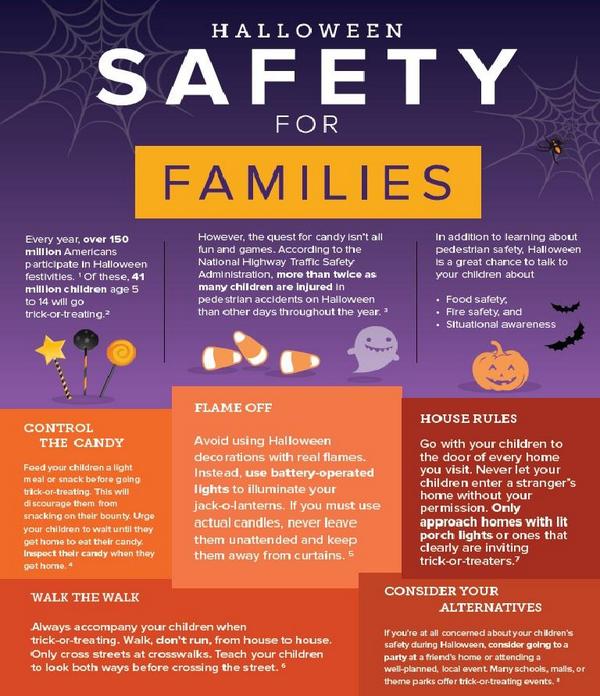
halloween safety for families

Today it’s short and sweet:  Keep your kids and pets safe this Halloween!

halloweensafety

If you are on Facebook and are interested in the things I may not devote an entire blog post to, but that make me wonder, piss me off, funny quips, photos and other things, I have a page followed by more than 2,000 people who find me engaging and/or mildly amusing:  https://www.facebook.com/extremeblondemoments

Very Disappointed By My Fitbit Experience

fitbit-logo-300x109I have bought and used many different fitness trackers from the Polar watch linked chest strap heart rate monitor to the Nike+ shoe insert, Adidas Micoach no strap/in the sports bra heart rate monitor, Scosche Arm Band, iFit Chest Strap Monitor, Garmin Vivofit, and others I’m sure I’ve bought and forgotten.  But, even when I’ve strayed and tried the flavor of the month, I’ve been a loyal wearer of the Fitbit from it’s first clip on to the latest Charge HR.

That said, I am quite disappointed that, as much as the Fitbit step monitoring product has “advanced” with each version, it has actually fallen behind the competition and I am strongly considering a change:

  • The clip-ons (Zip, Ultra, and One) had a tendency to unclip and disappear mid-workout
  • The Flex bands would come unsnapped during workouts, were brittle and cracked/broke, and worst of all, were apparently very yummy as my dogs chewed up 4 of them…hmmm
  • As soon as it became available, I bought a Fitbit Aria Scale.  Then I started noticing that I didn’t like having my weight broadcast to my Fitbit app and visible to my friends, “How Rude!”  Apparently there’s a setting to stop that, but my shame was complete, so Aria and I ended our brief & rocky relationship!
  • I loved the Force, which was on backorder forever then pulled off the market abruptly a short time later.  The Force was waterproof – I could finally track “steps” while swimming! But the Force also had a tendency to emit a gentle yet stingy pulse every once in a while that left a mark.  No Bueno indeed!  So I returned to one of my Flex models from the drawer of obsolete trackers.
  • With great excitement I saw the announcement for the Fitbit Charge and Charge HR that would be coming out in time for me to ask my husband to get me one for my Christmastime birthday.  He got on the waiting list at the local sporting goods store and we waited patiently for the arrival.  Finally the Charge became available so we snapped two of them up, anxious to see what all the hype was about.  Besides being a bit bigger and having a new secure wrist strap, the Charge was just a more expensive version of the Flex, but happily we wore it while I secretly pined for the arrival of the be-all-to-end-all.
  • The Charge HR! I don’t rely on steps alone to determine how my “Fit Day” has gone, I love the addition of a heart rate monitor that requires no chest strap and can count additional calories burned based on my actual 24 hour heart rate readings!  That’s the good, now here’s the bad of the Charge HR that I immediately replaced my Charge with once it became widely available in May of this year.  1) The plastic housing for the stat screen cracked in the first 2 months of normal wear, causing me to have to contact the company for a replacement 2) It is NOT waterproof, in fact it’s barely water resistant.  I had it on while standing in shallow water and got splashed.  When I touched the Charge HR to remove it to a dry place, I got a painful shock!  and 3) The battery life blows!  I have to charge it every 36-48 hours.  That is neither convenient nor does it allow me to get a whole day+ sleep picture.  Charging it during my 5 minute (CA drought/water use imposed) shower just doesn’t cut it.  I am in motion most of my day and have very few opportunities to take it off and charge it.  That is not what this Fit Girl envisioned at all!
  • They do have the Surge: A giant men’s watch-sized version that has a screen large enough to display all stats at once, but that doesn’t interest me at all.

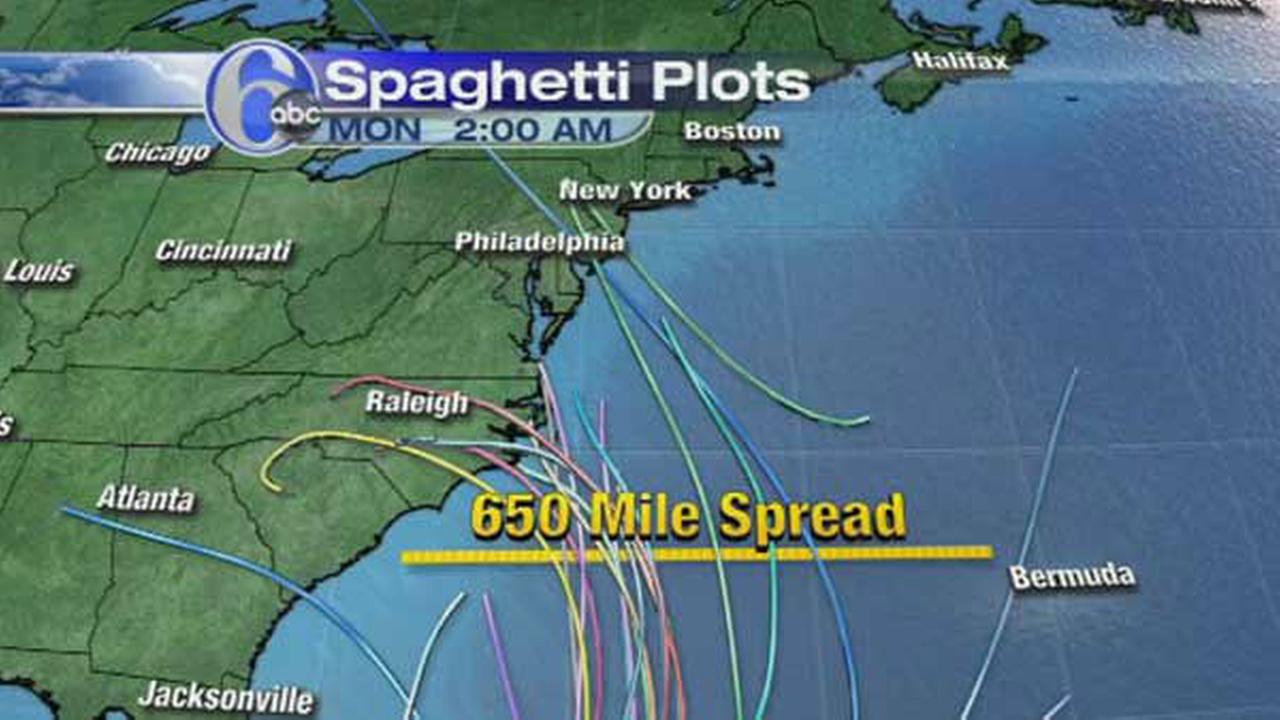
I have to say that my Garmin Vivofit has the most features that meet my needs:

  • It was less expensive than the closest Fitbit product with similar features
  • It has a battery that is guaranteed to last at least 1 year – no taking off to charge – big advantage
  • It can be worn 24/7 because it is truly water resistant.  During the many times I had to have my One, Flex, and Charge replaced due to loss or damage, I have worn mine in the shower, the pool and when very sweaty during workouts and never had an issue.  It’s kind of like the old Timex saying, “It takes a licking and keeps on ticking!”
  • It reminds you to stay active with move bar and audible alert
  • It learns your activity level and proposes a personalized daily goal
  • It shows steps, calories, distance and time of day on backlit display; monitors sleep
  • It doesn’t track how many flights of stairs I walk and give me fancy little achievement awards, but I can add the stairs as an activity and monitor them that way
  • It also won’t sync up to let me participate in Fitbit challenges, but I never win anyway (LMAO) so I can live without that “feature” too
  • It automatically syncs to Garmin Connect™ to save, plan and share progress
  • It does have heart rate tracking with the optional heart rate strap.  That it needs a strap to monitor heart rate is the only negative to me on this one.  If it had strapless heart rate monitoring I would have given up on my Fitbit long ago
  • Another negative to the Garmin Vivofit is that some Apps say they make it compatible to share with the Fitbit App for competing with your friends.  I have had great difficulty getting that to be a reality

all_color_garmin_vivofit-1024x501After all of the time, money and effort I’ve invested in Fitbit, I have come to the realize that I am better off going back to the Garmin Vivofit to monitor my fitness goals.  A very expensive lesson indeed.  Hmmm

If you are on Facebook and are interested in the things I may not devote an entire blog post to, but that make me wonder, piss me off, funny quips, photos and other things, I have a page followed by more than 2,000 people who find me engaging and/or mildly amusing:  https://www.facebook.com/extremeblondemoments

I Thought Blogging WAS a Non-Impact Activity

computerinjurySome of my 2000+ followers may have missed me for the past 2 weeks.  It seems that my obsession with using my computer, iPad and iPhone for communication, research and yes, blogging, has combined with my exercise routine to add yet another painful ailment deal with.

24 years ago I was a passenger in a car accident that broke my pelvis in multiple places, broke my ankle, caused a reverse curvature of my C-Spine, gave me a memory impairing concussion, and severely damaged my sciatic nerve which has resulted in doctors advising me not to take part in any high-impact activities ever since.

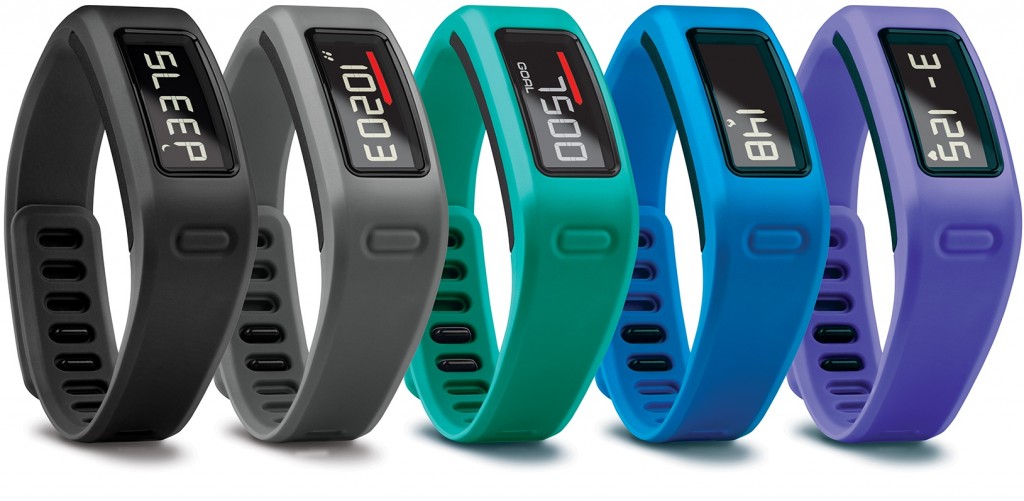
I try to follow their recommendations: I swim, do Pilates, walk (never run) on the treadmill, lift very light weights and I blog.  None of that should have caused me injury, but apparently all can contribute to the aches and pains I have radiating out from the teeny tiny little nerves in my neck, the cervical nerves:

  • C5 – controls the Deltoids (the rounded part of the shoulder) and the Biceps (flexion of the elbow and rotation of the forearm)
  • C6 – controls the muscles that make up the wrist extensors and enable wrist extension and hyper extension and the movements that are tied to the Biceps (front of the upper arm)
  • C7 – controls the Triceps (muscles in the back of the upper arm that allow the elbow to straighten)
  • C8 – controls the hands

I suffer from Cervicogenic Headaches:  Headaches originating from the neck often as a result of repetitive or prolonged turning of the neck (e.g. breathing during swimming), slouching (especially during sitting, sleeping or use of a computer), bending forwards of the neck (e.g. hunching over to read a phone/tablet), shoulders forwards activities (such as gripping the band handles for rowing or butterflies at Pilates).

The last two weeks have been unbearable.  I’ve had a nagging headache in the top of my forehead and in my temples; pain, stiffness and difficulty turning my neck; my mid-back, shoulder blades and elbows ache; I have painful pins and needles and numbness in my hands and fingers; as well as a few bouts of dizziness.

I thought I could manage the pain with trigger point injections in my neck and upper back and a good massage.  I was so wrong!  The combination resulted in  even more pain and numbness and now has me in wrist neutralizing braces while I’m awake as well as trying to sleep.

  • Neurontin combined with a muscle relaxant dulls the pain enough for me to get a few hours sleep at night, but I am only comfortable on my back.  Unfortunately lying on my back compresses the base of my skull on the right and makes the pain and other symptoms worse.
  •  Typing puts my wrists in the wrong position and sends shooting pains up my arm & directly across my shoulders to my neck symptoms that mimic Carpal Tunnel Syndrome.  So now I have wrist position neutralizing braces for use during the day and while I sleep.

mrtpicIf these remedies don’t start to work soon I will be off to my favorite ART (Active Release Techniques) and Myofascial Trigger Point Release practicing chiropractor, Dr. Ron Higuera.  He has worked minor miracles on my body, but there will be cussing, crying and pain while he’s fixing me, so I think I can be forgiven if I am willing to try the chicken’s way first…hmmm.

If you are on Facebook and are interested in the things I may not devote an entire blog post to, but that make me wonder, piss me off, funny quips, photos and other things, I have a page followed by more than 2,000 people who find me engaging and/or mildly amusing:  https://www.facebook.com/extremeblondemoments
There’s No Excuse Not to Be Prepared!

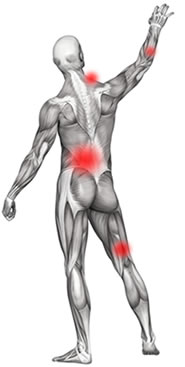
joaquin1For a few days now, I’ve seen news items regarding Hurricane Joaquin, which is headed Northwest through the Bahamas toward the eastern United States.  Forecasters are warning that there will be heavy rain, winds, and flooding from the storm surge.

joaquinfloodpotentialThe Weather Channel and other news outlets are warning that this will start this weekend and carry through into the first of next week.  News outlets are warning of “Historic rains” and naming specific states that should be preparing for their homes for a strong potential of flooding now.  Some are even suggesting getting away from down-slope areas through the weekend.

Other than worrying for friends and family, this storm will have no impact on me because I am on the WEST COAST, but I’m paying attention.  Unfortunately I know that, just like every other year, my television, Twitter feed, and Facebook will be flooded for the next week or two with stories and pictures of people and places being overrun, as if surprised by the arrival and impact of this Category 4 Hurricane (right now that means it has a wind speed range of 130-156 mph).

I’m sure I look like a bitch, but the tracking mechanisms and technology in place allow plenty of advance knowledge of the likelihood of the storms’ paths, so I have a couple of huge problems with what then always comes next.  Hmmm

  1. Pictures of people who didn’t evacuate as ordered and have become stranded causing first responders and other emergency personnel to risk themselves rescuing them when they could be helping those who legitimately COULD NOT get out of the storm’s way;
  2. The inevitable pleas for donations that are needed as a result of people:
  • Not evacuating when they had advance notice and warning
  • Not keeping the supplies necessary on hand: in basements/garages/attics, etc., to secure windows, etc. since they know that there is a great likelihood, due to where they live, that they will see storms
  • Not preparing their families and pets/livestock for the possibility of being on their own, without services for a time, and unable to leave where they are due to bad roads, debris or residual flooding after the storm passes
  • Not checking to make sure neighbors who may be less well off or who are elderly/disabled are adequately prepared or have made arrangements to evacuate

disasters background as words clouds.

So, for those who’d like a refresher, here is what FEMA recommends be done in preparation for the arrival of Joaquin, or any other severe weather or natural disaster that could occur where you live, for that matter:

  • Hurricane winds can cause trees and branches to fall, so trim or remove damaged trees and limbs to keep you and your property safe: especially those close enough to fall on your home
  • Secure loose rain gutters and downspouts and clear any clogged areas or debris to prevent water damage to your property
  • Reduce property damage by retrofitting to secure and reinforce the roof, windows and doors, including the garage doors (including sturdy weather stripping under and around doors, garage doors, outdoor basement access, and windows)
  • Purchase a portable generator or install a generator for use during power outages. Remember to keep generators and other alternate power/heat sources outside, at least 20 feet away from windows and doors and protected from moisture; and NEVER try to power the house wiring by plugging a generator into a wall outlet.

36 Hours before a storm:

  • Turn on your TV or radio in order to get the latest weather updates and emergency instructions
  • Build or restock your emergency preparedness kit. Include a flashlight, batteries, medicines, cash, a fully charged portable cell phone charger, Baby food/formula/diapers, Pet food/supplies (leashes), heavy duty trash bags, water, non-perishable food (stored in a sealed Rubbermaid type container or clean large locking trash can lined with a trash bag and zip tied closed to keep food dry), first aid supplies, heavy tarps and duct tape in case your building sustains damage allowing rain in, and copies of your critical documents in resealable bags to keep them safe
  • Plan how to communicate with family members if you lose power. For example, you can call, text, email or use social media. Remember that during disasters, sending text messages is usually reliable and faster than making phone calls because phone lines are often overloaded
  • Review your evacuation plan with your family. You may have to leave quickly so plan ahead
  • Keep your car in good working condition, and keep the gas tank full; stock your vehicle with emergency supplies and a change of clothes
  • Bring pets inside, crate them if you feel evacuation will be necessary or if they are particularly anxious.  Keep their harnesses or collars on for a quick snap of their leash in event of an emergency evacuation
  • Bring loose, lightweight objects inside that could become projectiles in high winds (e.g., patio furniture, garbage cans); anchor objects that would be unsafe to bring inside (e.g., propane tanks)
  • Cover all of your home’s windows. Permanent storm shutters offer the best protection for windows. A second option is to board up windows with 5/8” exterior grade or marine plywood, cut to fit and ready to install

6-18 Hours before projected storm arrival:

  • Turn on your TV/radio, or check your city/county website every 30 minutes in order to get the latest weather updates and emergency instructions.
  • Charge your cell phone and other portable wifi/cellular devices fully so you will have a full battery in case you lose power.  Shut off all but your cellphone to conserve power in those devices
  • Turn your refrigerator and/or freezer to the coldest setting and open only when necessary. If you lose power, food will last longer. Keep a thermometer in the refrigerator to be able to check the food temperature when the power is restored.  If you have prepared a 5 day or longer capable cooler with ice, store dairy and quickly spoiled foods in this.  Leave it shut!
  • If you’re not in an area that is recommended for evacuation, plan to stay at home or where you are and let friends and family know where you are
  • Check on your neighbors

With any luck this storm will decide to turn more to the east and dissipate over the Atlantic Ocean so that the impact isn’t as severe as forecasted, but it is never a bad idea to be prepared.

I’m reviewing my own emergency preparedness list for the El Nino rains forecasted for the west coast this winter, and the hard to predict, earthquakes that we get occasionally in California.

If you are on Facebook and are interested in the things I may not devote an entire blog post to, but that make me wonder, piss me off, funny quips, photos and other things, I have a page followed by nearly 2,000 people who find me engaging and/or mildly amusing:  https://www.facebook.com/extremeblondemoments

iPhone, iPod or iPad Not Charging?

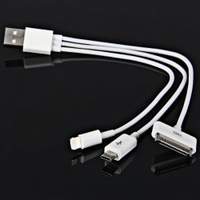
ichargerI have been through every version of the iPhone and am now on an iPhone 6.  I had a 2nd Generation iPad and upgraded to an iPad Air 2 with both cellular and wifi options for connection, as well as purchasing an iPad Mini for my husband.

The change from the old style charging cable to the lightning cables/port was great, for a while, but now, despite using Apple branded/supplied cables, blocks and docking stations, my Apple products display these messages intermittently:

  • Not Charging
  • This cable or accessory is not certified and may not work reliably with this iPhone/iPad (whichever happens to be plugged in)

To say I am frustrated is an understatement!  I love my Apple products (although I am a loyal PC girl) but I am at my wits end – I’ve even gone so far as to buy a Samsung Android based phone on another carrier just so I know I always have a hot backup.  Even I see that as an absurd waste of money.  I NEVER had this problem on the older versions of my iPhone and iPad but since I’ve upgraded I’ve had nothing but issues!

I’ve scoured the internet and read articles, forums, blog posts and watched videos all describing the same issue I’m having, but none of the suggested fixes have stopped the problems I am having!

All of the articles came to the same three conclusions:

  1. The wall adaptor (i.e. Block) is bad
  2. The Lightning or 30-pin USB cable is bad
  3. The charging port on the iPhone/iPad/iPod is bad
  4. The internal battery is bad
  5. The software has crashed and needs a refresh

Suggested Fixes:

  • Move to another wall plug – you could be using a bad outlet
  • Change the USB charging cable (The cables are prone to fraying at both ends and are covered under the Apple warranty.  It may be able to be swapped for free if you have a recently purchased Apple product)  If you are using a third party cable, make sure it’s a certified Apple compatible product (the cheap ones usually aren’t and fail a lot).  Amazon Basics are reliable and less expensive third party options, plus they have longer options than the standard supplied USB cables.  If you an charge via your computer, but not via the wall charger, or vice versa, your cable is not the problem.
  • Use a different charging block
  • Do a “Hard Reset” by pressing the power and home key simultaneously until the Apple logo appears then let go and let the reset finish

None of these suggested problems or fixes for them resolved my problem.

Today, after another day of struggling to keep my phone charged, I came across an article on c|net that suggested the problem could be microscopic debris in the USB port on the computer, the charging block, the USB Port on the computer/charging block/phone charger/portable charger, Or even the USB end of the charging cord.  Finally something new (that made sense) and that I hadn’t tried!

Hmmm

Think about the places that iGadgets get left: pockets, purses, briefcases, backpacks, desks, counters, floors, center consoles, car seats, virtually everywhere that dust, lint, dirt, and gunk gather.  That poor little charging port doesn’t have a chance!

A trick suggested by an Apple Guru is to take a small anti-static brush or brand new toothbrush and gently brush out your iPhone’s charging port.  Toothbrushes work well because the bristles don’t conduct electricity.  Make sure to brush out the USB ports on your computer, charging blocks, car chargers and the other ends of your charging cords then plug everything back in.

Hopefully you see the little lightning bolt in the right top corner of your device and your problem is solved.  If you don’t you may need to see if you’ve somehow damaged your charging port by getting it wet…I hope not because that could require either an expensive fix or complete replacement of your device.

If you are on Facebook and are interested in the things I may not devote an entire blog post to, but that make me wonder, funny quips, photos and other silly things, I have a page followed by more than 1,900 people who find me mildly amusing:  https://www.facebook.com/extremeblondemoments
Beware iPhone/iPad Wifi Assist

wifiassistToday is very short.

Users of Apple iPhones and iPads have begun complaining that an update to their operating system has resulted in unexpected data overages.  They are not imagining things.

Apple seems to have found a sneaky way to make it seem like they never lose data connection by boosting the crappy wifi adaptors in their products via installation and automatic activation of a feature called, “wifi assist” in the most recent ios9 update!  What this does is turn on your cellular data plan (the one you pay for – remember: wifi usage is free) to boost poor quality wifi signals.

While it seems like a good idea, consider the following:

  • Using Wifi on your apple devices is free – if your cellular data kicks in, it draws down your monthly contract allotment and you will run out, causing you to be charged for excess data usage at a higher rate per mb
  • Unlike the Facebook charge hoax that circulated yesterday, this story of a “hidden” potentially costly feature in ios9, is indeed true as reported on:  CBS News , Gizmodo, Mac World, zdnet, refinery29 and many other tech websites yesterday.  Click on any of the links above and you’ll be able to see the information.

I have unlimited data on my iPhone, thank God for the Grandfather clause in my plan, but not on my iPad.  Lo and Behold I checked, in the very strangely placed location for the on-off button, and found that the feature was automatically enabled on my iPad.

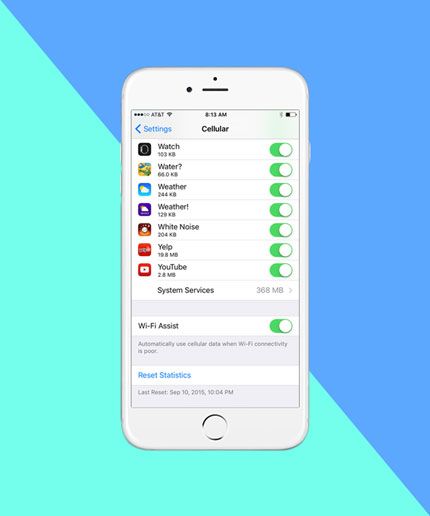
For those who don’t want to pay for a bunch of sneaky minute charges, here is how to turn off wifi assist:  The off switch is somewhat buried, located in Settings>Cellular near the very bottom of the screen, under the cellular settings for all of the apps installed on the phone. Click the button on the screen to off and you are good to go.

As soon as my husband gets home, I am making sure his settings are changed too!  Hmmm indeed!

If you are on Facebook and are interested in the things I may not devote an entire blog post to, but that make me wonder, funny quips, photos and other silly things, I have a page followed by more than 1,900 people who find me mildly amusing:  https://www.facebook.com/extremeblondemoments

Does He Not Realize He’s Turning You Off?

breaking-up-ex-girlfriendIn case you didn’t catch the recent article in Men’s Fitness Magazine, there are some very specific things that can turn a date with great possibilities into a chaste kiss at the door and an abrupt, “I’ll call you,” in no time flat. Hmmm

According to more than 500 real women polled, and a few other resources I found, these are the least attractive traits women find in the men they date:

  • Cocky: Acting Entitled and better than others
  • Bad Breath!
  • Being a Douche: Trying to upstage anyone and everyone
  • Conceited: Me, Me, Me behavior, conversation and interests
  • Chauvinistic: Puts women down to make him feel better about himself, or feels one woman isn’t enough
  • Dishonest
  • Lack of Communication: Always making plans at the last minute
  • Complaining about anything and everything.  Nothing is ever good enough for this blowhard who makes no effort to change what he’s complaining about or ask that it be made right
  • Lazy: Only makes the minimum effort to get by, no drive, no passion, no goals; leaves making of all plans up to you
  • Lack of Confidence or Insecurity: “Woe is Me” and “I’m not good enough” are definite turn offs as are controlling and jealous behavior intended to divert your attention from anyone else
  • Braggart: I obviously thought you were pretty great when I agreed to date you, I don’t need or want to hear how great you are FROM YOU
  • Aggressive Physical Behavior: Acting like you own me is a total turn off.  I don’t need to be pawed at in public just so you can prove your manliness to other men or show “She’s with me!”
  • Obsessed with Money
  • Irresponsible with his money (always crying poor) or Cheap
  • Poor Personal Hygiene
  • Undependable/Careless: Blows off dates, doesn’t return calls, depends on texts as main form of communication
  • Acting like you are his Therapist: Enough with the talk about your ex!
  • Rude:  Burping and Farting in Public as if he’s with the guys, Dismissive, Quick to Anger, Uses Racial/Sexual/Inappropriate Language, etc.
  • Sloppy in Appearance, His Home or Car 

badbreathNot only are the majority of these traits deal breakers, I think the existence of even a few  should set off red lights and warning bells. If these are the kind of men you are consistently attracted to or attracting, you might want to take a step back and examine what is drawing you toward these uncouth, unacceptable men.  Hmmm

If you are on Facebook and are interested in the things I may not devote an entire blog post to, but that make me wonder, funny quips, photos and other silly things, I have a page followed by more than 1,900 people who find me mildly amusing:  https://www.facebook.com/extremeblondemoments
22 Years Later, Tombstone Lives On

tombstone1While in Colorado over Christmas break in 1993, I was one of the opening weekend box office goers who saw Kurt Russell put a sexy spin on late 1800’s gunslinger, Wyatt Earp, in the movie Tombstone.  Add the smoky voiced Sam Elliott as crusty Virgil Earp and Val Kilmer’s irreverent personification of Doc Holliday and you have the perfect movie!

Critically, Rotten Tomatoes gave it a 73% “Certified Fresh” review, but the public loved it even more with a whopping 94% giving it “two thumbs up!”

Financially, Tombstone did eventually double it’s production budget of roughly $25,000,000 (largely financed personally by Russell) earning $56,505,065 in the United States before it was released to Video (which was still a money maker in the 1990’s) in November of 1994 where it earned an additional $22,000,000+, but in terms of today’s blockbusters that bring in that amount in a weekend, was it really a financial success?

With adjustments for the financial times, it can be said that yes, it was a success:

  • It is the 14th highest grossing film back to 1979; and
  • True West Magazine called it, “One of the 5 best westerns ever made”

For Tombstone virgins, although, after the many times it’s been on broadcast and pay television (even in it’s edited form) it’s hard to believe that there are any who haven’t seen the classic, there is a 10 minute compilation of classic scenes from the movie that is sure to whet your appetite to see the whole thing.

One viewing of this classic isn’t nearly enough.  You’ll love the whole thing: Robert Mitchum’s smoothly delivered narration that keeps the story moving, the detailed back stories, the humor, and for us ladies, the romance between Josie (played perfectly by the sultry “Guy’s Girl” Dana Delaney) and Wyatt that is wound throughout the film and comes t0 a satisfying conclusion.  You’ll want to watch it again and again, if for no other reason than to hear the memorable lines that are frequently heard in conversations and seen in print/online 22 years later. Hmmm

Among My Favorites:

  • “I’m Your Huckleberry”
  • “Why Johnny Ringo…Looks like someone just walked all over your grave!”
  • “Nonsense.  I have not yet begun to defile myself”
  • “I like men. If that means I’m not ‘lady-like’, then I guess I’m just not a lady!”
  • “It appears my hypocrisy knows no bounds.”
  • “You tell ‘em I’m coming … and Hell’s coming with me, you hear? HELL’S COMING WITH ME!”
  • “Your Spanish is as bad as your English! He’s quoting the bible, Revelations: Behold the pale horse The man who sat on him was death and Hell followed with him”

I have lost count of the number of times I have seen Tombstone, but I can tell you that, no matter how much of the movie I’ve missed, I generally watch anytime I come across it on my TV.  Watch it an you’ll see: Tombstone is an addiction!

If you are on Facebook and are interested in the things I may not devote an entire blog post to, but that make me laugh, wonder, piss me off, and scratch my head, or see funny quips, photos and other silly things, I have a page followed by more than 1,900 people who find me mildly amusing:  https://www.facebook.com/extremeblondemoments

An Open Letter to Whoopi Goldberg….We most certainly WERE Listening

I stopped watching The View years ago because of Elizabeth’s soap box and now I am hoping that the “powers-that-be” finally pull the plug on this show! There isn’t a life preserver large enough to save that sinking ship! Whoopi and the rest of the rag tag crew are an embarrassment to women.

R.J. Rudd's avatarRebecca's Ramblings

Since I saw The View’s so-called “apology” clip on social media, I’ve given this post a tremendous amount of thought. My first instinct and knee-jerk reaction was to sit down with my laptop and blast them with full force…unload my anger  and outrage onto the page…err…computer screen…so I could purge it and get all of that negativity out of my system. I’ll admit, I even got about a quarter of the way through that piece, when I stopped to re-read it. It was a scathing, searing diatribe that quite frankly, made me ashamed of myself. It sounded like something that the View Crew would say…it was petty, spiteful, angry and distasteful. That’s not who I am as a person, a writer or more specifically, a nurse. Quite frequently, I end my blog posts with a sentence urging my readers to be kind to each other. I am a tireless advocate for tolerance, peaceful coexistence and doing…

View original post 1,273 more words